
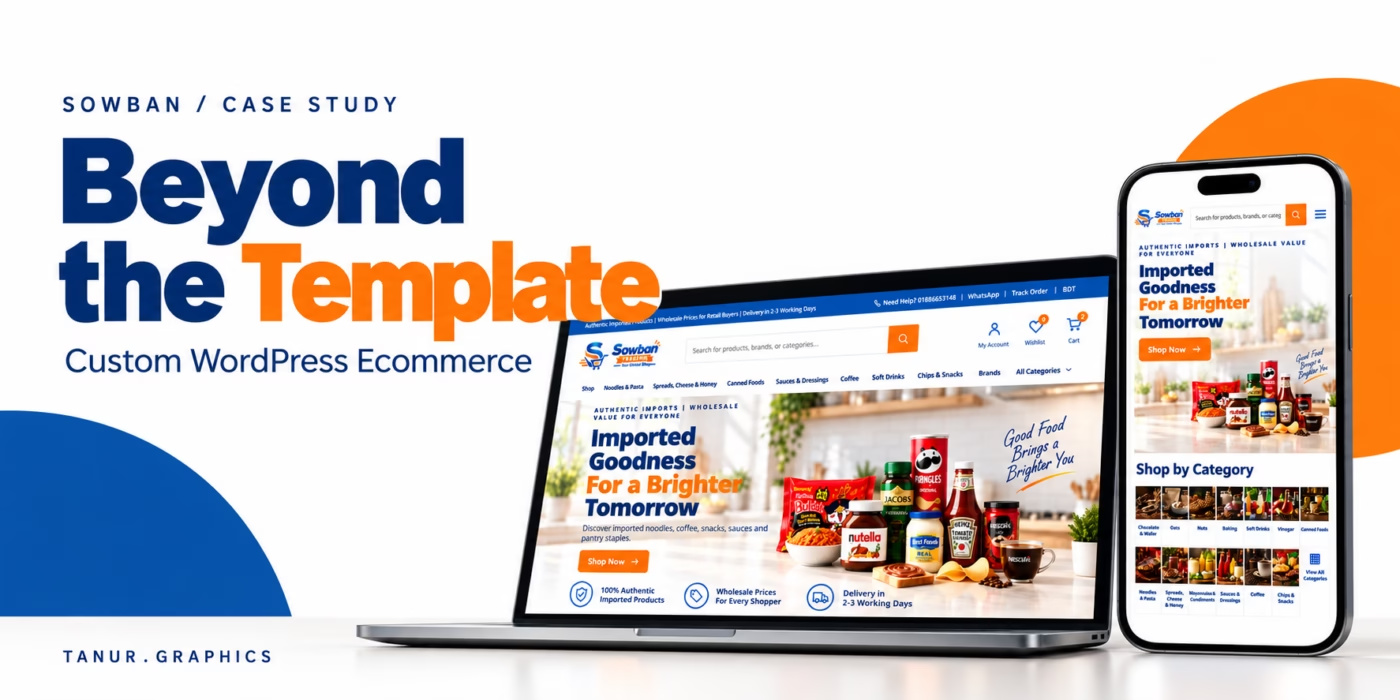
A polished storefront is only half an ecommerce website. The other half begins after the customer clicks Place order: products must stay organised, the owner needs a clear next action, the courier needs the right information, and the customer should be able to follow the order without calling for every update.
That is the larger story behind Sowban Trading, an imported food and grocery store for Bangladesh. I designed and developed the public shopping experience, but the deeper work was turning WordPress and WooCommerce into a practical operating system for an owner who should not need development knowledge to run the business.
This custom WordPress ecommerce case study goes beyond colours and product cards. It shows how the customer experience, the owner experience and the technical foundation were planned as one connected system.
Project perspective: Tanur Graphics completed the design and development described here. Screenshots were reviewed on 17 October 2026. Product prices, stock and delivery policies can change.
The real brief
Make imported groceries easy to discover and buy, then make every order easy for the owner to confirm, fulfil, communicate and track.
One website, three experiences
A useful ecommerce project is not a collection of disconnected features. It is one flow viewed by three different audiences.
1. The customer
Find the right product, understand the exact option, check out without repeated fields, choose a suitable payment method and track the delivery.
2. The owner
Control products, orders, customers, courier assignment, notifications, invoices, stock and promotions from a purpose-built workspace.
3. The foundation
Keep data structured, credentials protected, pages responsive and content understandable to search engines and AI-assisted discovery tools.
The shopfront: branded, useful and built with real catalogue data
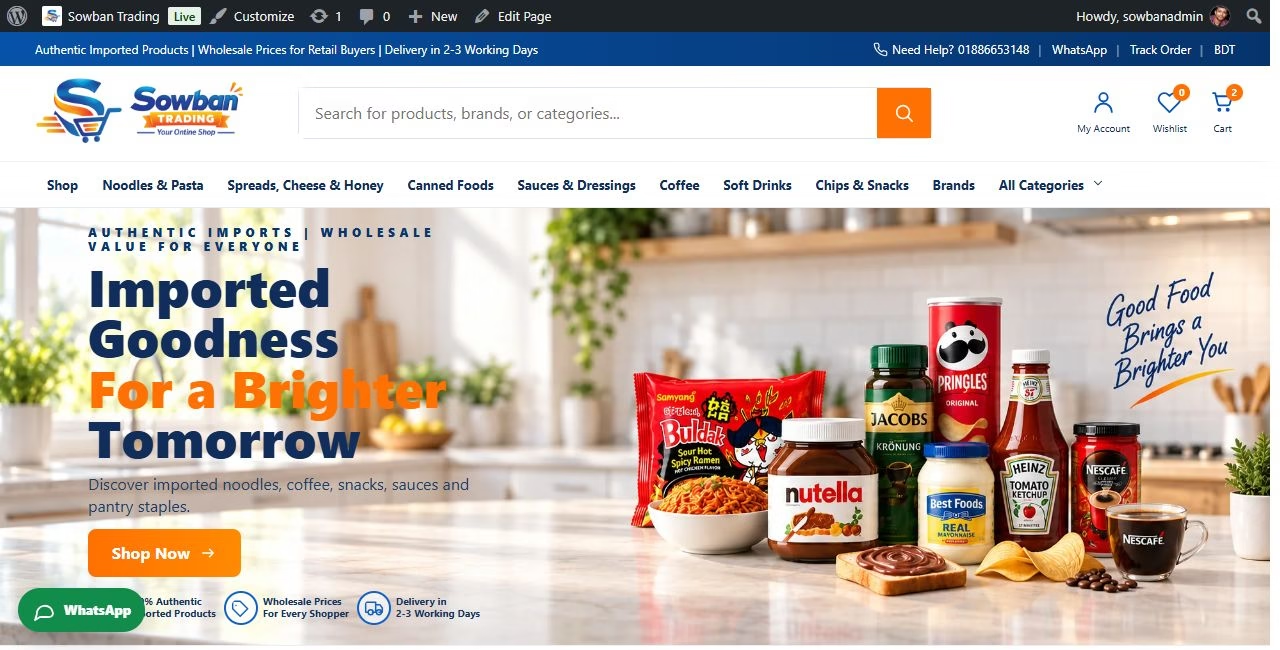
Sowban sells imported groceries in everyday retail quantities at wholesale-minded prices. That promise needs to be understood quickly. The blue and orange identity, grocery photography and direct value statements make the category recognisable, while search and category navigation let returning shoppers move immediately.
The design was tested with real titles, pack sizes, variable prices and stock states. That matters. A product card that looks perfect with placeholder text can break when a genuine title wraps to three lines or a variable product needs a price range. The interface was shaped around the catalogue, not the other way around.
Product choices that behave like buying controls
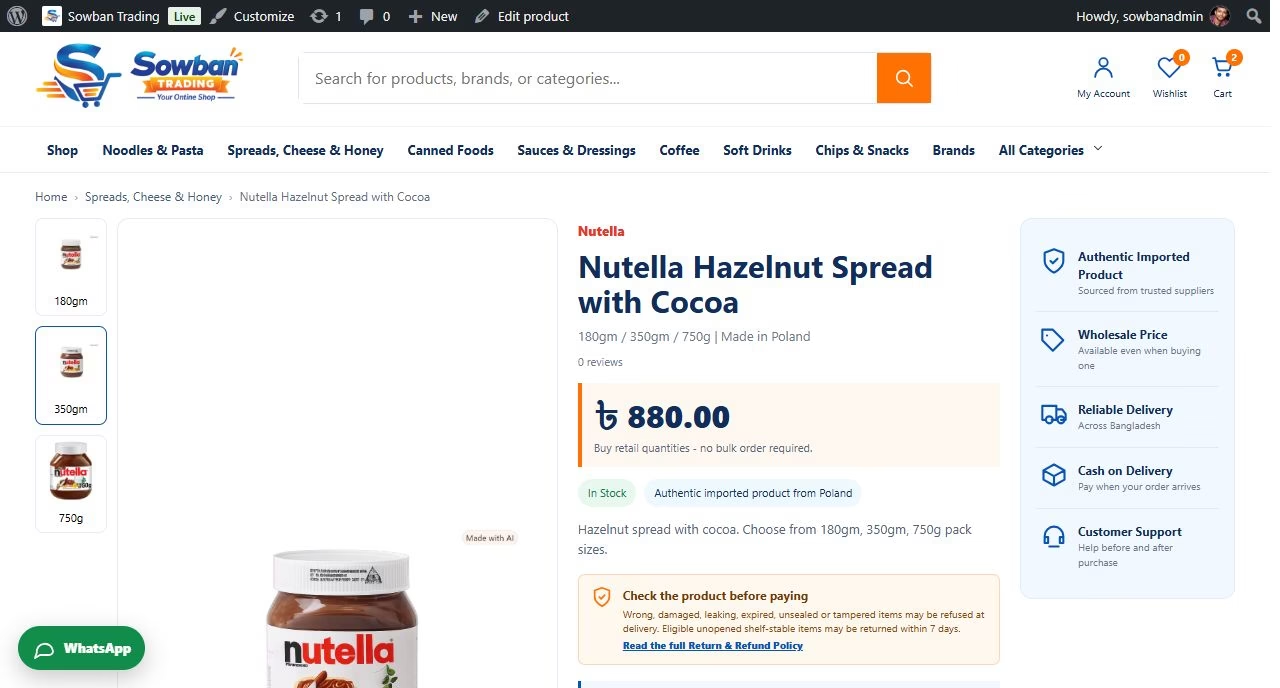
Imported products are detail-heavy. Similar jars may have different weights; one range may contain several flavours; images, stock and prices may change by variation. The product page must help the shopper choose the exact item instead of simply displaying a gallery.
On supported variable products, the gallery and variation controls work together. Selecting a variation image selects its matching option, then updates the relevant price, stock and product detail. A shopper can move visually, while WooCommerce still receives a precise variation.
The catalogue rules also follow shopping behaviour. Different weights of the same item can belong to one product. Distinct flavours are separated when they deserve independent discovery, while a range such as bakery ingredients can remain together when a flavour selector is the clearer decision. The result is not a blanket database rule; it is considered merchandising.
Search that understands how grocery shoppers browse
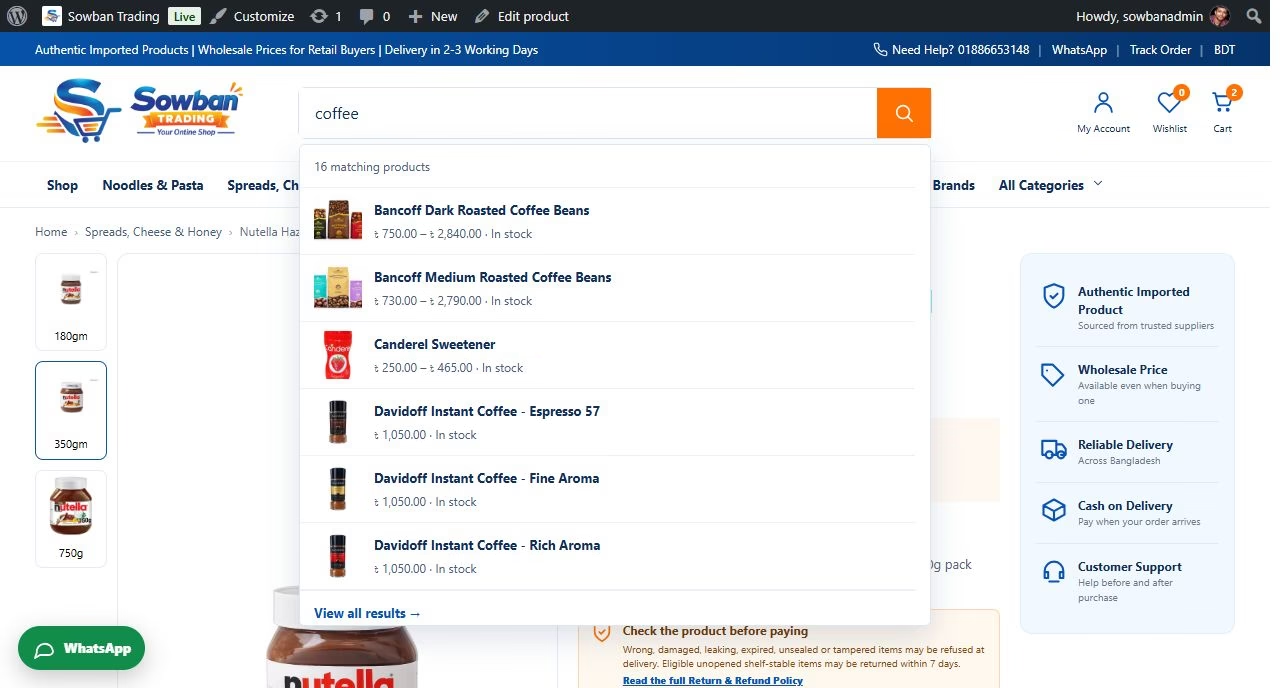
A customer may search by product, brand or category. Sowban’s live search returns useful product matches with images, prices and stock information, then offers routes into relevant brands and categories. It shortens the distance between intention and a product page.
This is also a data-quality feature. Search works best when names, brands, weights, origins and images are consistent. Cleaning and organising the catalogue therefore improved both the visible interface and the information behind it.
A checkout that asks only what the order needs
The checkout is organised into three short steps so customers can concentrate on one task at a time:
- Contact: name, phone, optional email and delivery option.
- Delivery: city, zone, optional area and one long street-address field for house, road, building, floor or apartment.
- Payment: the methods available for that customer’s location.
Removing duplicate town, district and postcode questions makes the form easier to understand. The address helper explains what belongs in the street field, while structured Pathao city and zone selections provide the delivery data needed for pricing and booking.
Payment rules reflect the business rather than a generic global template. Manual bKash and Nagad advance payment support the intended workflow, and cash on delivery remains available inside Dhaka. The language is deliberately clear: a manual advance payment is not presented as an instant card gateway.
Shipping is shown honestly. The checkout estimate is calculated from product net weight. A courier may later weigh the complete packaged parcel and charge slightly more. The customer sees a short explanation that any difference will be discussed before payment, and the same principle is reflected in order communication and policy content.
The owner side is a product too
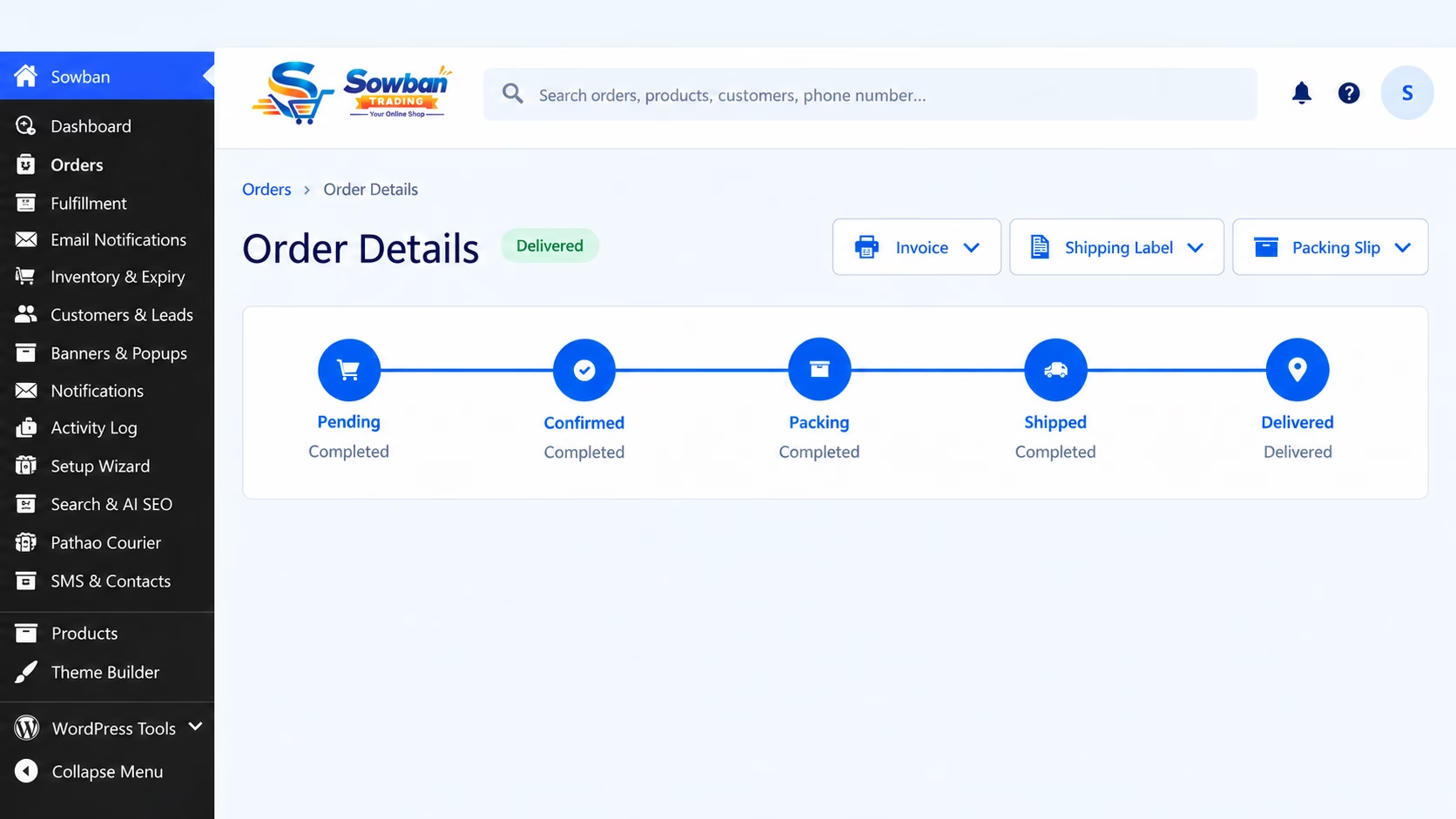
This is where the project moves beyond a shop theme. A business owner with no development knowledge should not have to hunt through technical WordPress screens to complete ordinary work. Sowban has a focused store-management navigation for orders, fulfilment, email notifications, inventory and expiry, customers and leads, banners and popups, activity history, search and AI SEO, courier controls, SMS contacts and products.
The single-order screen gives the owner a readable journey from Pending to Confirmed, Packing, Shipped and Delivered. Key documents such as invoices, shipping labels and packing slips are available where the order is being managed. The interface speaks in store operations, not developer terminology.
What the owner can do without touching code
Add products, organise brands and categories, manage variations, images, stock and important product facts.
Confirm, pack, assign delivery, print documents, review notes and follow a complete activity timeline.
Control order email, targeted SMS, customer contacts and the tracking route without sending unnecessary messages.
Update banners, popups, navigation, policies and discoverability settings from named owner tools.
From a new order to a delivered parcel
The fulfilment workflow was designed as a sequence of decisions, not a hidden automation that the owner cannot understand.
Admin alerted2. Confirm
Customer updated3. Assign courier
Pathao or own delivery4. Track
Status returned to Sowban5. Delivered
History retained
After confirmation, the owner chooses the delivery path. Selecting our own delivery keeps the order inside Sowban. Selecting Pathao creates the appropriate courier workflow and allows delivery-status updates to return to the store. Existing parcels that were created manually before the integration can also be reconciled with their consignments instead of being abandoned outside the website.
Customers receive a Sowban tracking link rather than being sent into an unfamiliar admin or courier system. The customer-facing order tracking page uses the store order reference and surfaces courier progress in one branded place.
Communication follows the same restraint. The administrator receives the pending-order alert. After approval, the customer receives the confirmation and tracking route. Email remains optional at checkout, and confirmed customer contact details can support the store’s consent-aware customer list.
Operational details that prevent small problems becoming daily work
Many valuable improvements are deliberately unglamorous. They remove repeated questions, duplicate data or fragile manual steps:
- Variation thumbnails can select the corresponding product option.
- Broken or missing variation gallery images can fall back to the product image.
- Frequently Bought Together items link to their product pages.
- Product details avoid repeated pack-size rows and outdated payment claims.
- Pending-order email reaches the administrator even when a customer does not provide email.
- Order emails and invoices use consistent Sowban branding and clear delivery wording.
- Courier assignment is a conscious owner choice, so own delivery never creates an unwanted Pathao order.
- Activity history records important fulfilment changes for later review.
Each item is small in isolation. Together they determine whether the store feels dependable after launch.
Speed, security, SEO and AI-search readiness
These subjects should be built into the project, not added as marketing stickers at the end.
Performance
Responsive media, stable image spaces and focused interactions keep the interface useful across screen sizes. Features are added for a business purpose, avoiding unnecessary visual weight.
Security and continuity
Courier and messaging credentials stay in protected settings rather than public page code. Role-focused admin tools, input validation, activity history and maintainable backups reduce operational risk.
SEO
Clear page hierarchy, descriptive titles, alt text, internal links and consistent product attributes give search engines useful, crawlable information instead of thin catalogue pages.
AI search
Consistent entities such as brand, product, origin, size and availability make the catalogue easier for search and answer systems to interpret. This improves readiness; it does not promise inclusion or ranking.
No serious developer should promise a search position, an AI citation or a perfect speed score without evidence. The responsible goal is a clean technical base, understandable content and an admin process that helps the owner keep the information accurate.
Mobile is a different working space, not a smaller desktop
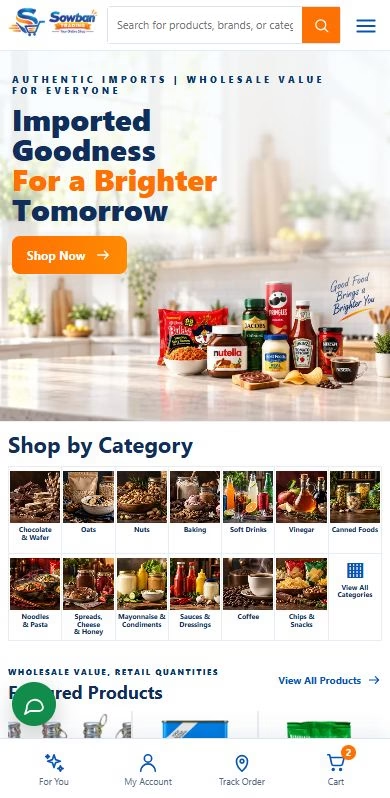
On mobile, Sowban keeps the search field prominent, makes categories easy to scan and preserves repeated actions in bottom navigation. Product images, option controls and checkout steps are arranged for touch rather than squeezed from the desktop layout.
What stays easy on a small screen
- Search is visible before deep navigation.
- Category imagery supports fast recognition.
- Variable-product controls remain touch-friendly.
- The three-step checkout reduces one long form.
- Account, wishlist, cart and tracking routes stay reachable.
When custom WordPress ecommerce is worth it
A standard WooCommerce setup can be right for a simple catalogue. Custom development earns its place when the business has connected requirements: unusual product options, location-based payment rules, courier pricing, a defined approval process, branded tracking, owner-friendly operational screens or data that must move between services.
Before requesting a quote, bring five things:
- A sample product list with real sizes, variations, images and stock requirements.
- Payment and delivery rules for each customer location.
- The exact order steps the owner follows today.
- The services that need to exchange data and the exceptions a person must review.
- The people who will maintain products, orders and content after launch.
This produces a more accurate scope than a list of visual effects. It also reveals the features that can save the business time every day.
Build the storefront and the business tool together
Sowban’s public interface is important: customers need confidence, useful product choices and a smooth route to purchase. But the strongest result is broader. The owner also has a clear workspace, delivery decisions connect to the correct courier path, communication follows the order, and product information supports both human shoppers and machine discovery.
That is my definition of a world-class custom website: the outside earns attention, the inside helps the business operate, and the technical foundation can be maintained after launch.
If you are planning a customised WordPress site, WooCommerce store or redesign with specific integrations, explore my WordPress website design service. Published plans are a starting point; a Sowban-style catalogue, owner workspace and courier workflow needs a tailored scope.
Request a custom WordPress or ecommerce website quote and tell me what customers should experience, what the owner needs to control and which systems must work together.