
Packaging Artwork Preflight Checklist
A practical, interactive way to check a packaging file before it leaves design and enters prepress. Work through the five production stages, then finish with the 30-point handoff checklist.
Keep the 30-point checklist beside your artwork
Get the designed, printer-friendly PDF. No account required. Optional design-resource emails.
Jump straight to the part you need
This guide is intentionally modular. Use it from start to finish, or open only the production stage you are checking.
What should you focus on?
Choose your role. The guide stays the same, but the priorities change.
Packaging designer priorities
Protect the approved structure, organize production layers clearly, verify functional elements, and make the exported PDF easy for prepress to inspect.
The five-stage preflight
Think of preflight as a production funnel: structure first, PDF last. Fixing a dieline problem after export is the expensive way around the maze.
Structure
Dieline, dimensions, folds, glue, bleed and safe areas.
Artwork
Layers, images, colors, typography and approved copy.
Functional
Barcodes, QR codes, variable and regulatory content.
Finishing
Foil, varnish, white ink, embossing and overprint.
PDF & handoff
Export, Acrobat preflight, revision control and proof.
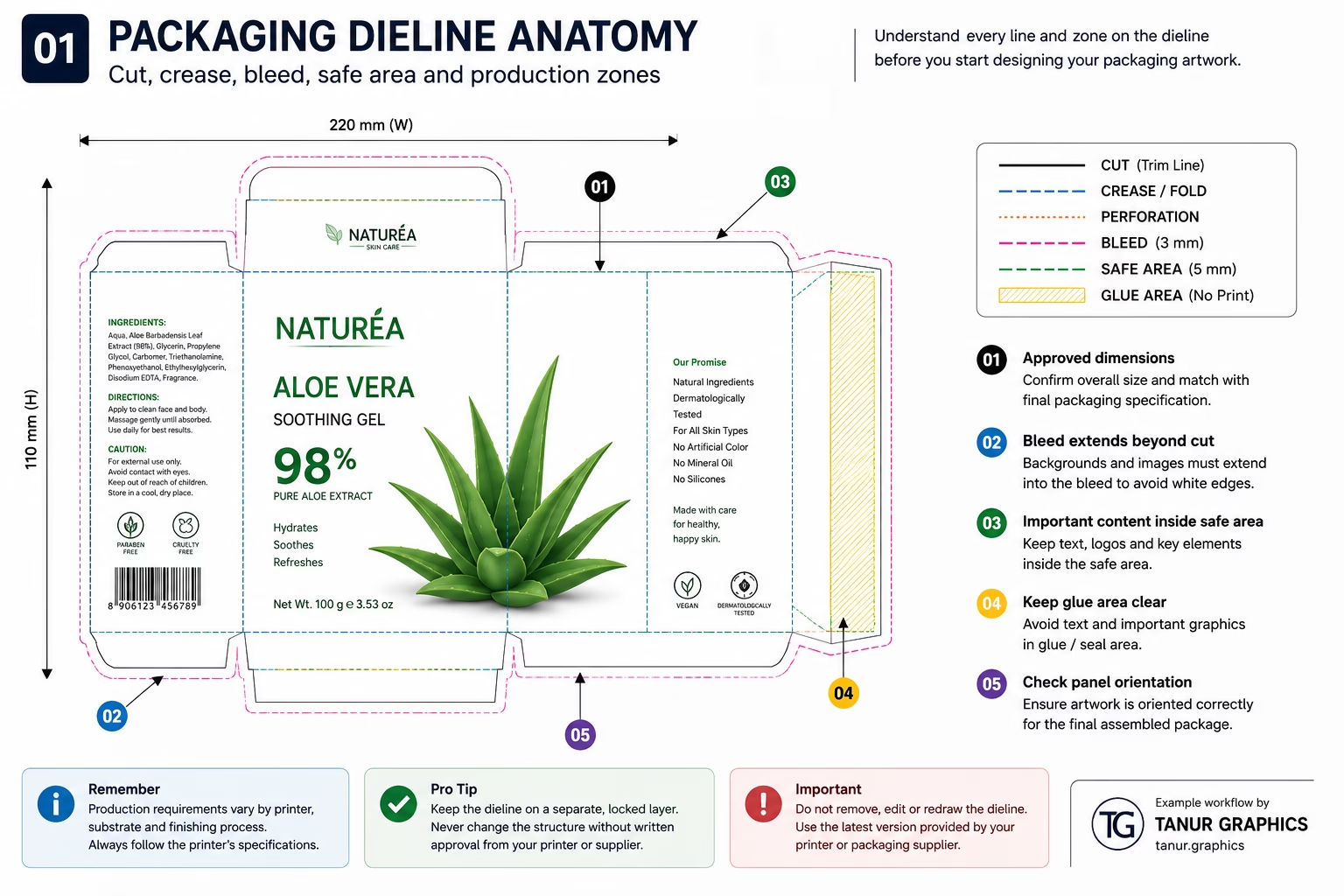
01 · Structure: approved dieline, bleed and panel logic
Approved dieline
Before judging graphics, verify that the artwork is sitting on the correct production structure.
- Correct dieline revision and final dimensions
- Scale has not been changed accidentally
- Cut, crease/fold, perforation and cutout lines are understood
- Glue and seal areas are identified
- Panel orientation matches the assembled pack
- Important graphics do not cross risky folds or seams unintentionally
Bleed and safe areas
- Backgrounds extend into the printer’s required bleed
- Critical copy and logos remain clear of cuts and forming areas
- Small text and barcodes avoid seams, folds and sealing zones
02 · Artwork: layers, images, color and typography
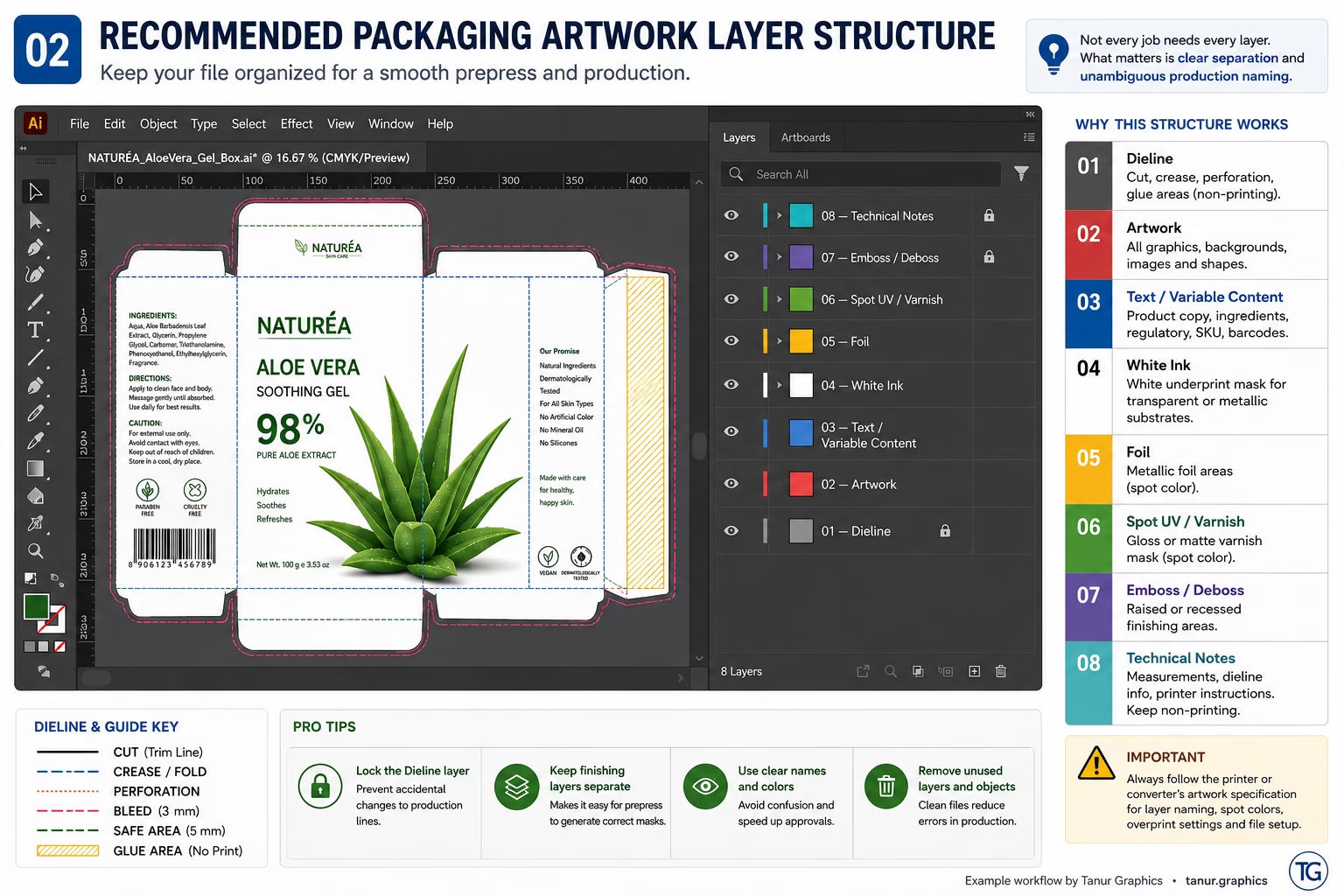
Organize the file
- Separate dieline, artwork, text and technical production layers
- Remove obsolete hidden artwork and old dielines
- Name foil, varnish, white-ink and embossing layers clearly
- Confirm all linked graphics are available
Images and color
- Effective image resolution is suitable at final size
- Unintended RGB elements are identified where CMYK is required
- Spot colors are intentional, consistently named and not duplicated
- Rich black and 100K black are used intentionally
- Total ink coverage follows the production specification
Typography and copy
- No missing-font substitutions
- Small and reversed-out type is checked for print suitability
- Text stays clear of cuts, folds and seams
- Artwork is compared against the final approved copy source
03 · Functional: barcodes, QR codes and variable content
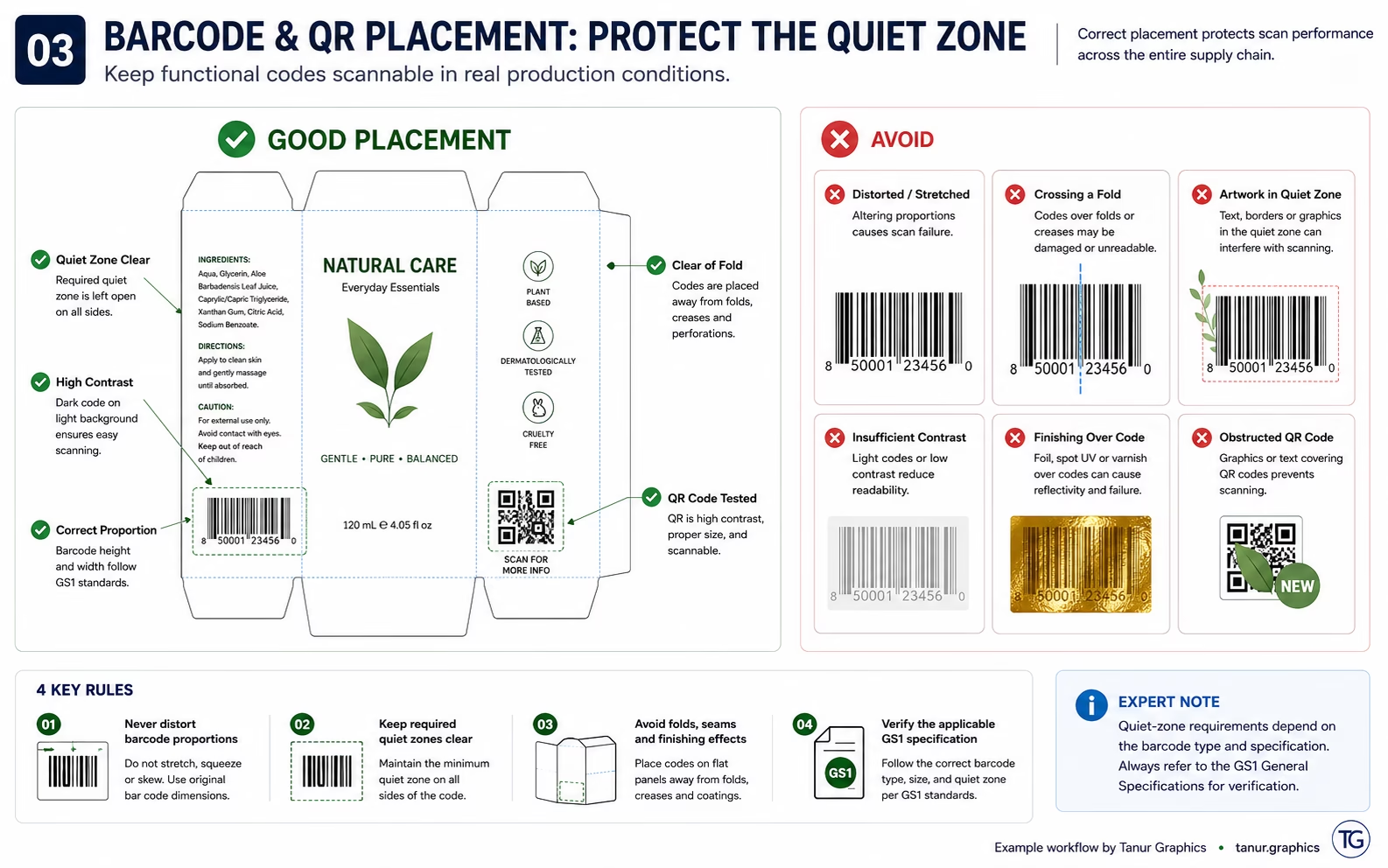
Barcode and QR checks
- Correct barcode data and symbology are supplied
- Barcode proportions have not been distorted
- Required quiet zones remain clear
- Contrast is suitable and surrounding graphics do not interfere
- Barcode avoids folds, cuts, seams and problematic curves
- QR destination is tested
- Production verification is completed where required
Variable and regulated content
- Product name, SKU and GTIN match the approved source
- Net content, ingredients, warnings and mandatory copy are verified where applicable
- Manufacturer/importer information and regulatory marks are not changed casually
- Batch, lot, manufacturing and expiry areas are correctly reserved where required
- Language variants are checked against the approved version
04 · Finishing: foil, varnish, white ink, embossing and overprint
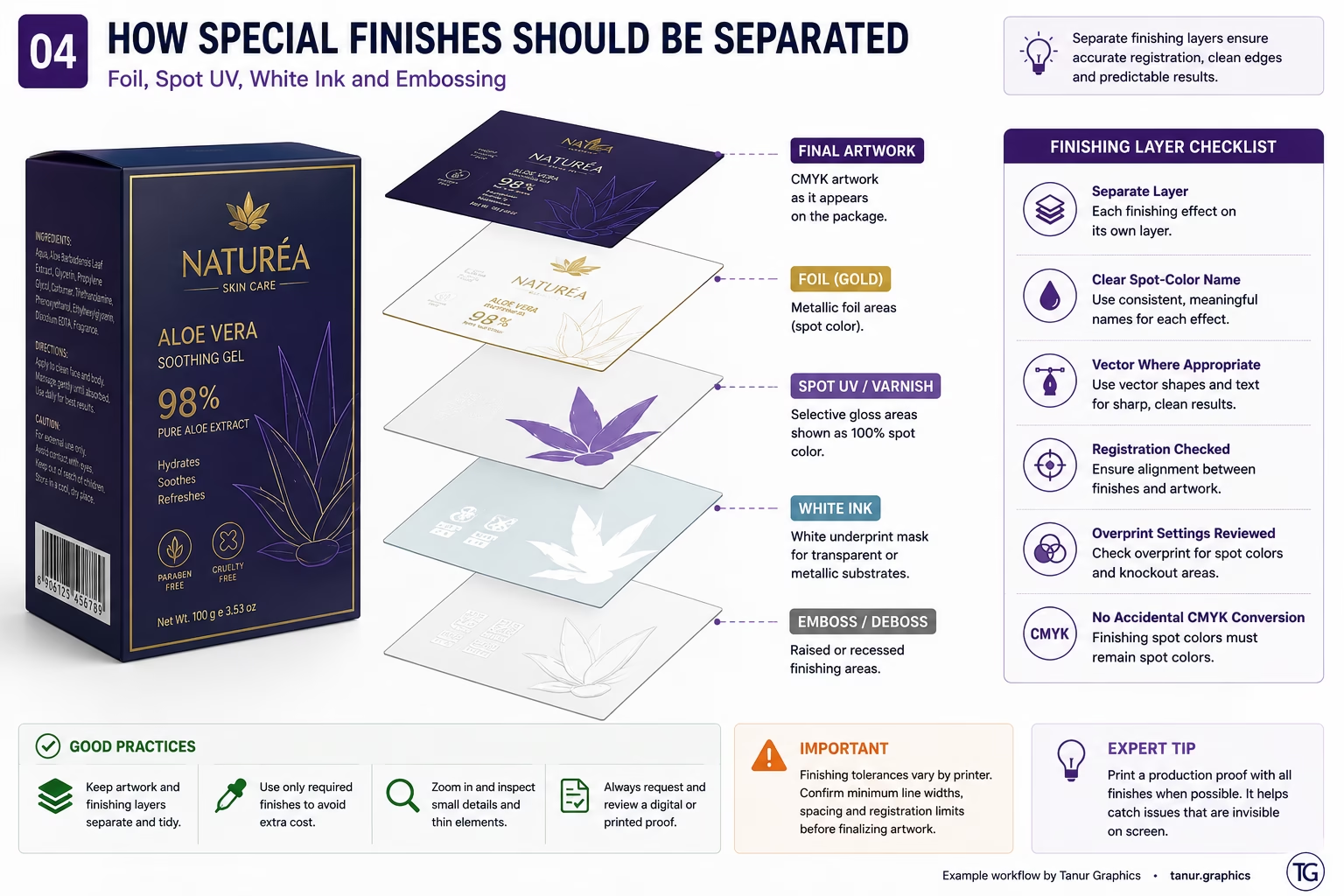
Separate production masks
- Foil artwork sits on its own clearly named layer
- Spot UV / varnish is separated from printed artwork
- White ink is separated where the substrate/workflow requires it
- Emboss and deboss areas are clearly distinguished
- Finishing masks align correctly with the underlying graphics
- Very fine finishing details are confirmed with the printer
Overprint and transparency
- White objects are not accidentally set to overprint
- Black overprint behavior is intentional
- Spot-color interactions and knockouts are inspected
- Transparency behaves correctly in the chosen output workflow
- Separations are previewed before handoff
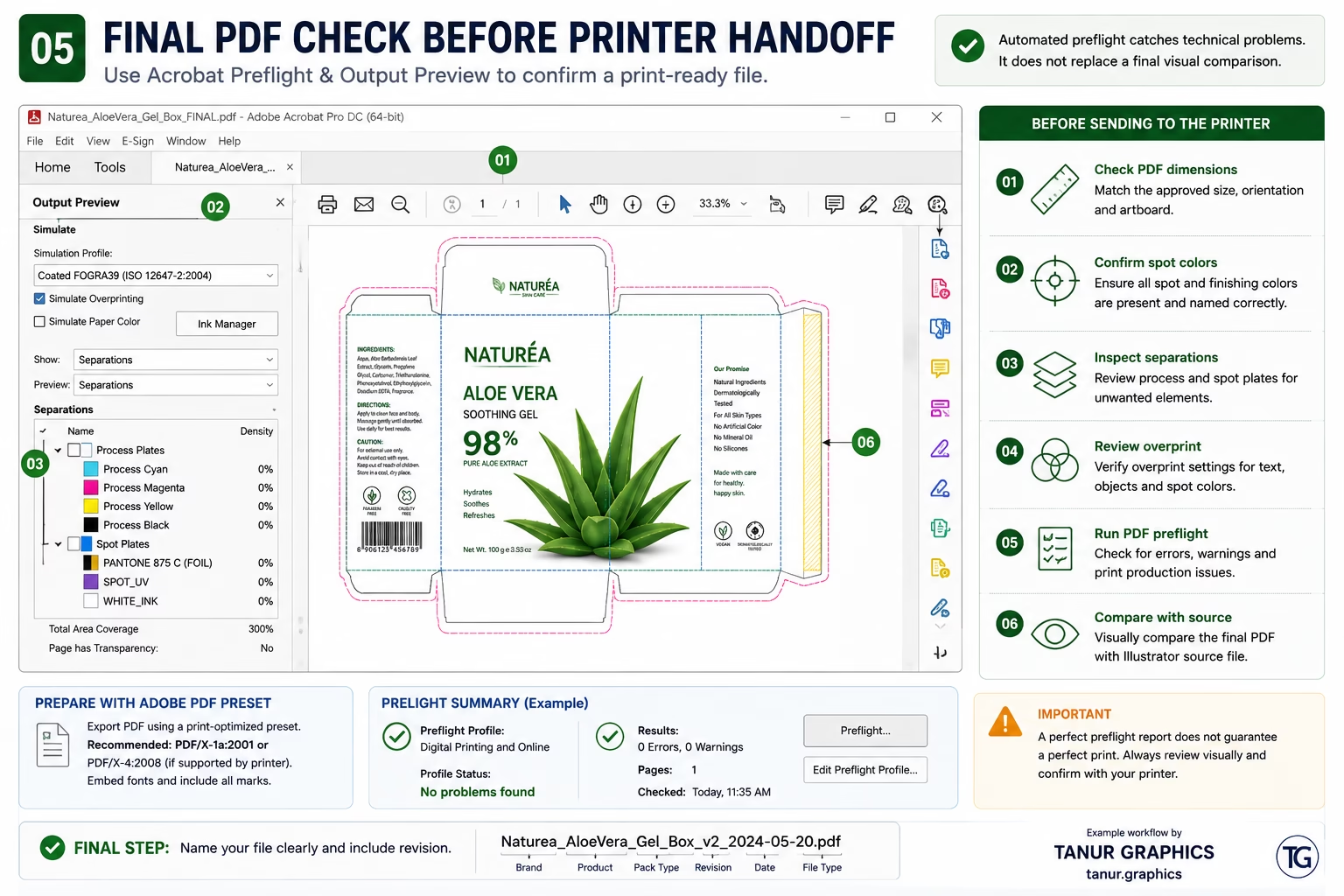
05 · PDF & handoff: export, Acrobat preflight and revision control
Export
- Correct artboard/page and final dimensions
- Required bleed is included
- Printer marks are included only when requested
- Fonts, color conversion, spot colors and output profile follow the production specification
- Requested PDF/X or custom preset is used
Acrobat preflight
- Review image resolution, colors, fonts and transparency
- Inspect output intent and separations
- Review overprint behavior
- Compare the exported PDF visually against the source artwork
Handoff
- Filename and revision are unambiguous
- Source file, linked assets and technical notes are supplied only as requested
- Spot-color / finishing references are clear
- Proof and approval process is confirmed before production
Common mistakes worth catching early
These are the tiny gremlins that turn into expensive reprints.
Your final 30-point preflight
Tick items as you review the file. Your progress is saved in this browser. Printing the web checklist stays free; the designed PDF download opens the optional lead form.
Structure
Artwork
Functional + finishing
PDF + handoff
Quick FAQ
The short answers to the questions that usually derail a handoff.
Should packaging artwork always use 3 mm bleed?
No. Bleed requirements vary by printer, equipment and packaging format. Follow the printer or converter’s specification.
Is PDF/X-4 always the correct export?
No. PDF/X-4 is common in modern professional print workflows, but the printer’s requested PDF/X standard, preset and color-management settings take priority.
Should fonts be outlined before printing?
It depends on the printer’s workflow. Keep an editable master file and follow the production requirement for embedded or outlined type.
What files should I send to the printer?
Send the approved production PDF and any source files, linked assets, fonts, spot-color references or technical notes the printer specifically requests.