
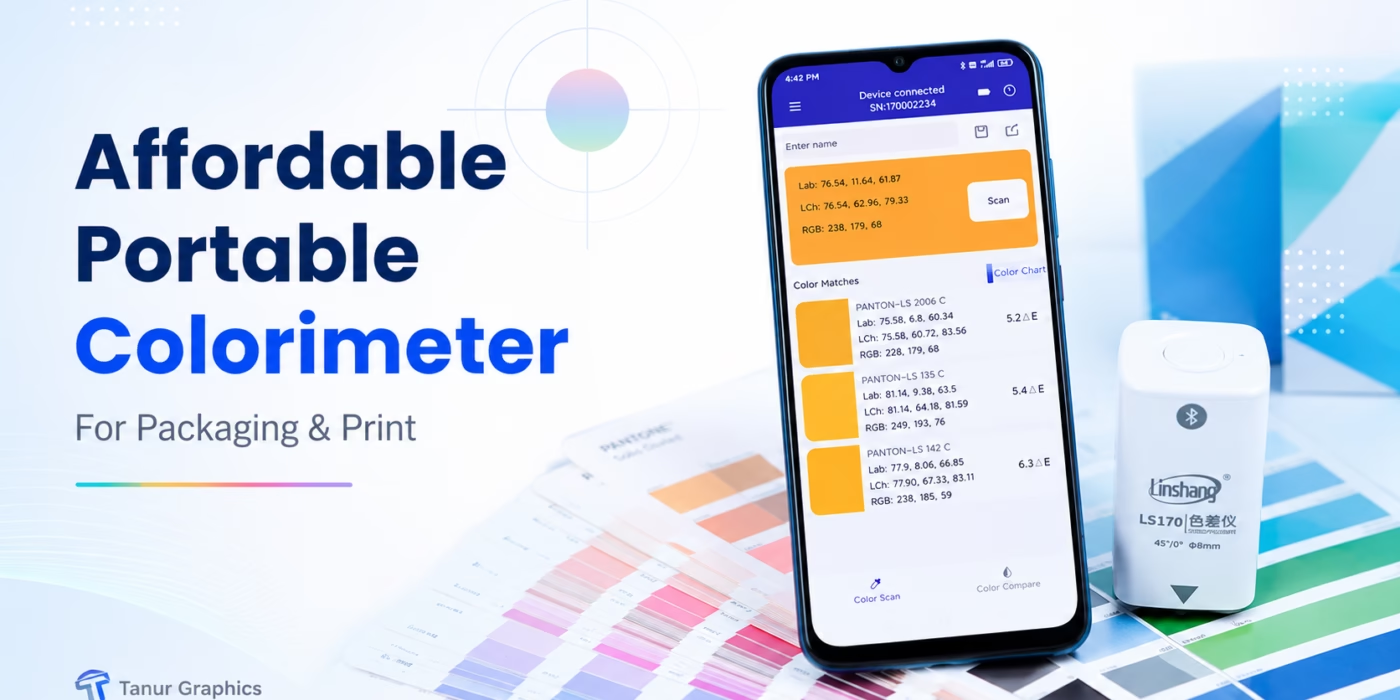
Affiliate disclosure: I purchased this colorimeter for my own packaging and print workflow. Some links in this article are affiliate links, which means I may earn a small commission if you buy through them, at no extra cost to you. I only recommend tools I believe can genuinely help designers, printers, packaging teams, and small businesses.
Color is one of those things that looks simple until a printed carton comes back from production and suddenly the blue is too violet, the red feels dull, or two batches that were supposed to match clearly do not.
I deal with this problem constantly in packaging and print design. A color can look perfect in Adobe Illustrator, look slightly different on a monitor, change again on paper or board, and then change once more under a different light source. For years, the most reliable color-measurement tools I saw were professional instruments with prices that made them difficult to justify for everyday checking.
That is why I recently bought a compact portable colorimeter from Alibaba to test whether a lower-cost device could become a practical part of my real packaging workflow at Tanur Graphics.
Why I Bought a Colorimeter in the First Place
As a packaging and print designer, I am not trying to replace a printing press laboratory or a full professional spectrophotometer. My goal was much simpler: I wanted an affordable device I could keep nearby and use to scan a printed color, compare a sample against a standard, check Delta E, and get a more objective answer than “this looks a little different to me.”
That distinction matters. Human vision is excellent, but it is also influenced by lighting, surrounding colors, fatigue, monitor settings, paper tone, varnish, and even what color you looked at a few seconds earlier. A small measurement tool gives me another data point before I start arguing with a printer, changing artwork unnecessarily, or approving a batch based only on eyesight.
The Buying Conversation With Emma
Before placing the order, I spoke with Emma from the supplier on Alibaba. I did not want to spend a large amount of money on a professional color-measurement instrument before knowing how useful one would actually be in my daily packaging and print workflow.
My main concern was simple: could this affordable LS170 give me useful color information for printed packaging, including Hex, CMYK, Pantone references, and color comparison?
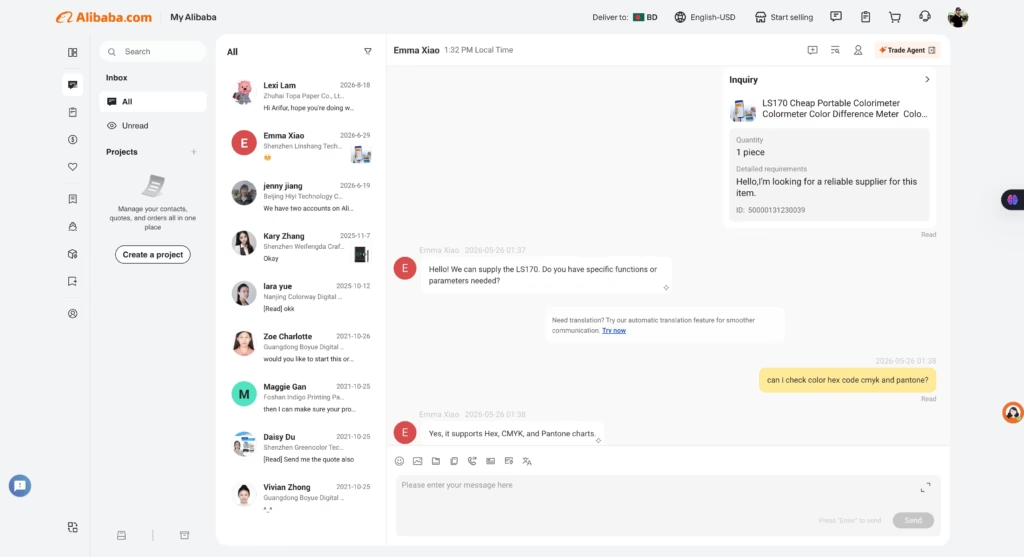
Emma first replied:
Emma: “Hello! We can supply the LS170. Do you have specific functions or parameters needed?”
I explained what I was looking for:
Me: “Can I check color Hex code, CMYK and Pantone?”
Her answer was straightforward:
Emma: “Yes, it supports Hex, CMYK, and Pantone charts.”
That immediately caught my attention because those were exactly the kinds of references I wanted to check while working with packaging and printed materials.
We also had several discussions about the quality of the device and what I actually needed from it.
The rest of our conversation was along these lines:
Me: “I mainly work with packaging, labels and printed materials. I want to compare the printed color with an approved sample. I do not need a very expensive laboratory instrument at the moment.”
Emma: She explained that the LS170 was suitable for general color measurement and comparison and that the app could be used to view and compare the measured color information.
Me: “My main reason for buying it is to check whether two printed colors are close or noticeably different. Can I compare two samples?”
Emma: She confirmed that the device supports color comparison through the app, which was one of the most important features for me.
Me: “I have seen many much more expensive colorimeters with more functions. For my kind of work, I want something simple and affordable first.”
Emma: She helped clarify the functions of the LS170 and answered my questions about what the device could and could not do.
That conversation gave me more confidence to try this model.
I wasn’t looking for the most advanced color-measurement system available. I wanted a reasonably priced entry point into objective color checking, especially for packaging and print samples.
There are plenty of higher-priced instruments with more advanced functions, and if your work requires professional laboratory-level measurement, spectral data, advanced QC, or strict production tolerances, those devices may be worth the extra investment.
But for me, the LS170 looked like the right place to start.
I wanted something that could help me answer practical questions such as:
- Is this printed blue actually different from the approved sample?
- How large is the color difference?
- What is the measured Lab value?
- What Hex or CMYK reference does the app show?
- What is the nearest Pantone reference suggested by the software?
- Can I save and compare colors from different print samples?
Instead of buying the most expensive device first, I preferred to start with an affordable colorimeter, use it in real packaging projects, and understand how much value color measurement could add to my workflow.
That was ultimately what convinced me to place the order.
What This Portable Colorimeter Actually Does
The unit I bought corresponds to the Linshang LS170-style app-connected colorimeter described in the supplied manual. It uses a 45°/0° measurement geometry, a full-spectrum LED light source, an 8 mm measuring aperture, D65 illumination and a 10° field of view. A measurement takes about one second.
- Color spaces: CIE Lab, Luv, LCh, Yxy, CMYK, RGB and Hex
- Color-difference formulas: ΔE*ab, ΔE*uv, ΔE*94, multiple CMC options and ΔE*00
- Repeatability: stated standard deviation within ΔE*ab 0.03 under the manufacturer’s specified white-tile test conditions
- Connection: Bluetooth to the LScolor mobile app
- Charging: USB Type-C
- Size: approximately 31.7 × 31.7 × 70.4 mm
- Weight: about 51 g
- Battery: the manual states up to 10,000 measurements on a full charge under its test conditions
The lack of a built-in display is actually part of why the device stays so small. The phone becomes the screen, storage system, color library and comparison interface.
The Feature I Care About Most: Delta E Color Comparison
If you work in print, the most useful part is not getting a Hex value from a piece of paper. The more valuable function is comparing one physical color with another.
In the app, you can measure a standard color, measure a sample, and see the color difference between them. The software can show the difference in Lab components and calculate a ΔE value using the selected formula. You can also set a QC tolerance so the app gives a PASS or NG result.
For packaging work, that gives me a practical way to ask better questions. Instead of saying, “This carton looks too warm,” I can compare the approved sample and the new sample, look at the direction of the Lab shift, and see whether the difference is small or significant according to the tolerance being used.
Why This Makes Sense for Packaging Designers
Packaging designers sit in an awkward space between digital artwork and physical manufacturing. We create colors on-screen, but the final result depends on ink, substrate, coating, machine settings, plate condition, material batch, drying, lighting and many other production variables.
That is also why I wrote my Packaging Artwork Preflight Checklist. Good packaging is not only about making attractive artwork. It is about reducing avoidable production problems before they become expensive.
I see this colorimeter in the same way: not as a magical “perfect color” button, but as another checkpoint in a practical print-control workflow.
A Simple Workflow I Recommend
- Calibrate the device using the supplied base/standard tile, especially if it has not been used for a while.
- Choose a clean, flat and uniform area of the printed sample.
- Scan the approved reference and save it with a clear name, such as “Carton V1 Approved Blue.”
- Scan the production sample from a comparable location.
- Use Color Compare to review Lab changes and ΔE.
- Repeat the measurement at several positions if the printed area is large or potentially inconsistent.
- Record the result with the job name, material and batch information instead of relying on memory.
This is much more useful than scanning one random point and treating that single number as absolute truth.
Electronic Color Matching Is Helpful, but Do Not Treat It as a Pantone Oracle
The app includes electronic color charts and can return the closest matching color codes. According to the manufacturer, its color-card matching accuracy is above 90% under its stated conditions. That is convenient for exploration and quick reference.
But I would not use a low-cost colorimeter to blindly replace a physical approved standard, a properly controlled color workflow, or a professional spectrophotometer when a print specification requires one. Substrate, gloss, surface texture, optical brighteners, metallic inks, fluorescent colors and measurement geometry can all complicate what “matching” really means.
What I Like About It
- It is genuinely portable. At roughly 51 g, it is easy to keep in a bag or on a desk.
- Measurements are fast. The manual specifies about one second per measurement.
- Delta E comparison is immediately useful. This is the feature that makes the device relevant to actual print checking.
- QC thresholds are built in. You can define a tolerance and get a simple PASS/NG result.
- The app stores measured colors. That makes it easier to build a small job-specific reference library.
- Multiple color spaces are available. Lab is especially useful for objective comparison, while RGB, Hex and CMYK can be handy for quick communication.
- USB-C charging and Bluetooth keep the workflow simple.
What You Should Know Before Buying
I would rather tell you the limitations than pretend a budget tool can do everything.
- There is no built-in display. You need the phone app for readings and settings.
- Your phone screen is not the measurement. The manual specifically warns that displayed colors can look slightly different on different phone screens. Trust the numerical values, not the screen swatch alone.
- Surface condition matters. The sample should be flat, clean and reasonably uniform.
- It is a colorimeter, not a universal replacement for a professional spectrophotometer. Some print and industrial workflows require spectral data, specific measurement conditions, certification, smaller apertures, SCI/SCE control or other capabilities.
- Color-card matching is a convenience feature. Do not turn “closest digital match” into an approval standard unless your workflow explicitly allows that.
Affordable Colorimeter vs. More Advanced Instruments
There are many higher-priced colorimeters and spectrophotometers on Alibaba with larger feature sets. If you run a print shop, laboratory, coating operation, plastics factory, textile line, or a tightly controlled color-critical production workflow, paying more can make sense.
My choice was different. I wanted to start with a cheaper portable colorimeter because my immediate need was straightforward: scan, compare, understand the direction of a color shift, and add objective data to packaging print checks.
My suggestion: buy for the job you actually need to do. If a small app-connected colorimeter solves 80% of your everyday checking, there is no prize for overspending. If your customers require traceable professional color measurement, spectral data or certified production tolerances, buy the instrument that meets those requirements.
Colorimeter vs. Spectrophotometer: Which One Do You Need?
A portable colorimeter is excellent for quick color measurement and difference comparison. A spectrophotometer measures spectral reflectance across wavelengths and is generally the more capable choice for advanced color formulation, profiling and tightly controlled production environments.
For my current purpose at Tanur Graphics, I wanted a practical bridge between visual inspection and expensive professional measurement equipment. That is exactly where this device makes sense.
Who I Think Should Consider This
- Packaging and label designers who frequently review physical print samples
- Small print shops that want a simple color-comparison tool
- Brand owners checking consistency between packaging batches
- Graphic designers who want to understand Lab and Delta E using real objects
- Quality-control teams needing a basic portable comparison device
- People working with paper, ink, paint, coatings, plastics, leather or other solid-color surfaces
If you are completely new to packaging production, you may also want to read my guide to the key principles of packaging design and explore my packaging and print design services.
Who Should Probably Buy Something More Advanced?
- Print laboratories working to strict ISO or customer-specified measurement conditions
- Teams creating ICC profiles or doing spectral color formulation
- Factories that require certified instrument-to-instrument agreement and traceability
- Anyone measuring very small areas, unusual surfaces, metallics, fluorescents or materials that require specialized geometry
- Businesses whose customer contract explicitly specifies a particular professional instrument or measurement standard
My Verdict
For me, the value of this colorimeter is not that it turns a designer into a color scientist. It is that it replaces part of the guessing with numbers.
When I am looking at two printed samples and thinking, “They are close, but something is off,” I now have a small tool that can help quantify that difference. For an affordable device that fits in a pocket, that is genuinely useful.
If you work with packaging, labels, print samples, paint, plastics, or other color-sensitive products and you have been curious about getting a colorimeter without jumping immediately to expensive professional equipment, this is a sensible place to start.
For the manufacturer’s technical information, you can also visit the official LS170 product page.
Frequently Asked Questions
Is a portable colorimeter useful for packaging design?
Yes, especially for comparing physical print samples, recording Lab values and checking Delta E between an approved reference and a new sample. It should complement, not replace, the production standards required by your printer or client.
Can this colorimeter measure CMYK and Hex?
The app supports CMYK, RGB, Hex, CIE Lab, Luv, LCh and Yxy display formats. For print-quality decisions, I would pay more attention to Lab and Delta E than treating a scanned CMYK value as a press recipe.
Does it work without a phone?
The LS170-style unit has no built-in display, so the mobile app is an important part of the workflow. The device connects over Bluetooth.
Can it replace a Pantone book?
I would not treat it as a complete replacement for a physical approved color standard. Electronic color matching is useful for finding close references, but print approval should follow the standard agreed with the client and printer.
Is this better than buying an expensive spectrophotometer?
Not universally. It is cheaper and simpler, which can be exactly right for basic comparison work. A professional spectrophotometer is the better investment when your workflow requires spectral data, certified tolerances, advanced software, profiling, special measurement geometries or other production-grade functions.
Note: Specifications in this article are based on the user manual supplied with my unit and the manufacturer’s published LS170 information. Marketplace prices, shipping, seller details and product bundles can change, so check the current Alibaba listing before ordering.